Turn a Photo into a 3D Cartoon

Upload a selfie, portrait, or pet photo to create a cartoon with rounded features and soft shading. You'll get a still image with a 3D look, ready to use as an avatar or illustration.
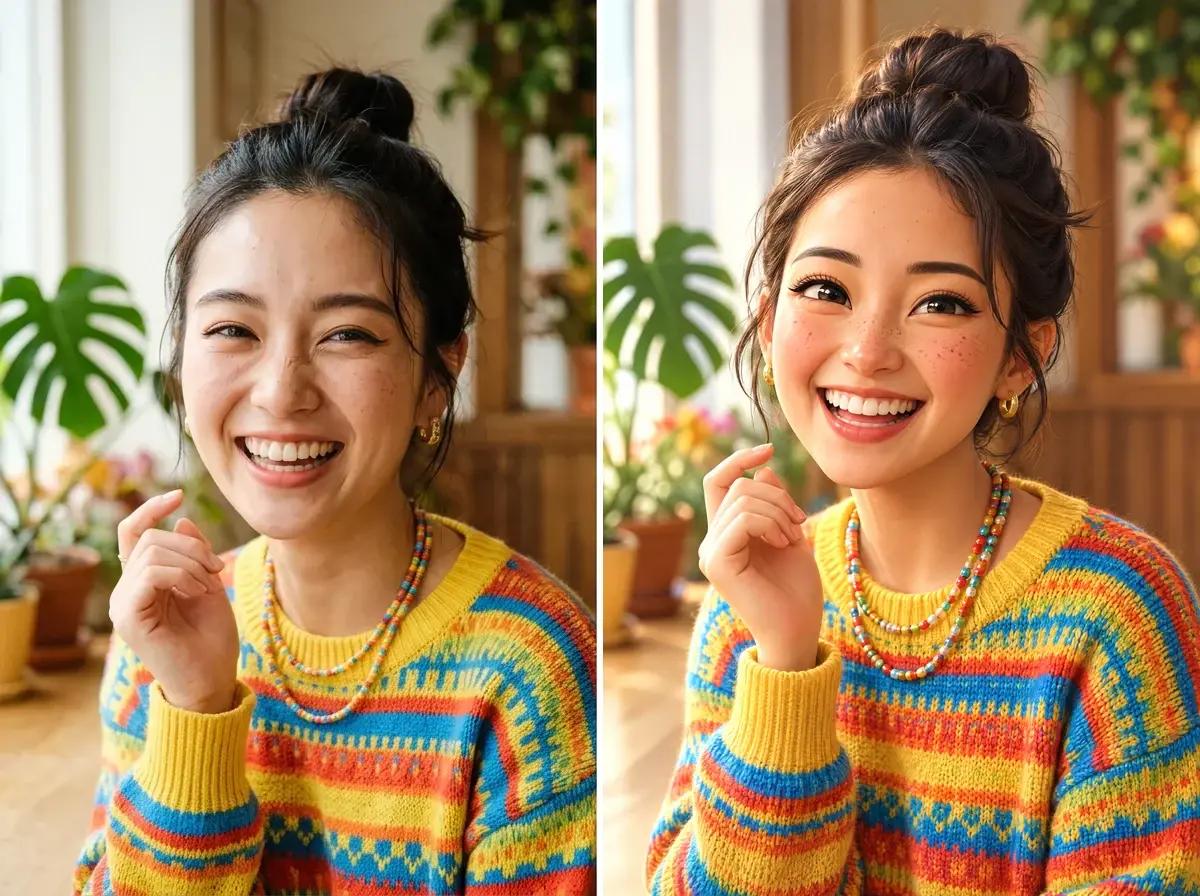
Woman in a striped sweater, original photo beside a 3D cartoon portrait

Support: JPG, JPEG, PNG | Max file size: 10 MB

OR

Free to try • Photo or text input • 3D-style images

4.9 / 5.0

User Rating

1,000+

Reviews

100K+

Happy Creators

Create More Scenes with Your Character

Use your cartoon as a reference in the Neolemon app to create new poses and story scenes.

No Photo? Describe Your Character

Describe who your character is, their main features, and what they wear. Keep the details specific, such as curly brown hair, round glasses, or a red coat.

The Character Formula

[Who they are]+[Key details]+[What they wear]

Character formula example showing a young girl with labels: Who they are (young girl, child, toddler), Key details (orange wavy hair, big brown eyes, rosy cheeks), What they wear (pink beanie, navy coat, red sneakers)

Example 3D Cartoon Prompts

"A young boy, curly brown hair and green eyes, wearing a red hoodie and blue jeans"

3D cartoon boy with curly brown hair and green eyes wearing a red hoodie

"A teenage girl, long black braids and warm brown skin, wearing a yellow sundress"

3D cartoon girl with long black braids wearing a yellow sundress

"A friendly old wizard, long white beard and kind eyes, wearing purple robes and a pointed hat"

3D cartoon wizard with white beard wearing purple robes and pointed hat

Photos Turned into 3D Cartoons

Compare the original photos with their 3D-style cartoon portraits.

Person in a colorful sweater, original photo beside a 3D cartoon portrait
Woman with curly hair, original photo beside a 3D cartoon portrait
Man in a knitted sweater, original photo beside a Pixar-style portrait
Older man with a white beard, original photo beside a 3D cartoon portrait
Older woman wearing a scarf, original photo beside a 3D cartoon portrait
Woman in a black sweater, original photo beside a 3D cartoon portrait
Girl wearing a knitted hat, original photo beside a 3D cartoon portrait
Boy with red hair, original photo beside a Pixar-style portrait

How to Convert Photos to 3D Cartoons

Upload a photo, select 3D Cartoon, and generate your image.

1

Upload or Describe

Upload a clear photo of one person or pet. If you don't have a photo, describe the character you want to create.

2

Pick Your Art Style

Choose 3D Cartoon for a rendered cartoon look. You can also try Pixar Inspired or Claymation 3D.

3

Download Your Cartoon

Generate your cartoon, then download the result. For larger prints, use the Neolemon app's upscale feature.

Choose a Cartoon Style

Start with 3D Cartoon, or explore other looks such as Pixar Inspired, Claymation 3D, and Chibi.

Pixar Inspired

Pixar Inspired

3D animated movie style

Chibi

Chibi

Cute, big head style

3D Cartoon

3D Cartoon

Rendered 3D characters

Claymation 3D

Claymation 3D

Stop-motion clay style

Perfect For

📚Children's Book Illustration
📱YouTube & Social Content
🎓Educational Materials
👤Profile Avatars
📖Amazon KDP Publishing
🎨Cartoon Stories & Comics

Why Choose Neolemon for 3D Cartoons?

Photo to 3D Cartoon Character

Turn a photo into a 3D-style character image, then use it as a reference for further edits in the Neolemon app.

Consistent Characters

Generate 10, 20, or 50 images and your character looks identical in all of them. Other AI tools can't do this.

Create Cartoon Storybooks

Create illustrations for different moments in your story using the app's pose, expression, and background editors.

Different Cartoon Styles

Try different styles for your first character, then keep the same style as you build the rest of your illustrations.

Which Photos Work Best for 3D Cartoons?

Get better results in seconds. Here's what makes a great source photo.

Good Photos

Clear well-lit photo suitable for AI cartoon generation
Clear & Well-Lit

Natural daylight, face fully visible

Close-up portrait photo ideal for AI cartoon transformation
Close-Up Shot

Head and shoulders fill most of the frame

Photo with visible eyes looking at camera for AI cartoon
Eyes Visible

Subject looking toward camera, eyes in focus

Photo with clean simple background perfect for AI cartoon
Simple Background

Less clutter = better AI recognition

What to Avoid

Blurry motion photo example showing what to avoid for cartoons
Motion Blur

Moving subjects create unusable images

Dark underexposed photo example to avoid for AI cartoons
Too Dark

AI struggles to detect features in low light

Distant photo showing what to avoid for AI cartoons
Too Far Away

Subject should be the main focus

Multiple subjects photo showing why to focus on one at a time
Too Many Subjects

Upload one main subject per photo

💡Pro Tips for the Best Cartoon Results

  • 1Use your phone's portrait mode for automatic background blur
  • 2Photograph at eye level for a more engaging result
  • 3Already have a great photo? Even older pictures work perfectly

Use Your Character in New Scenes

See how Neolemon keeps your cartoon characters consistent across every image — the same technology powering your pet portraits.

Create characters that stay identical across 20, 50, or 100+ images. Perfect for children's books, social content, and animated stories.

Continue with the Neolemon App

Character Consistency

Neolemon
Same character across 50+ images
Generic AI
Different every time
Filters
No character memory

Illustration Styles

Neolemon
12 curated styles
Generic AI
3-5 basic options
Filters
Preset filters only

Create Cartoon Storybooks

Neolemon
Multiple scenes & poses
Generic AI
Single images only
Filters
Not possible

Generation Speed

Neolemon
~15 seconds
Generic AI
1-3 minutes
Filters
Instant

Print Resolution

Neolemon
300 DPI ready
Generic AI
Varies
Filters
Often 72 DPI

Background Removal

Neolemon
Included free
Generic AI
Often paid add-on
Filters
Not available

Free Trial

Neolemon
No signup required
Generic AI
Usually requires account
Filters
Free with ads

Sign up for the Neolemon app to edit your character's pose and expression, combine characters in a scene, or upscale an image for printing.

Get 20 free credits when you sign up. No credit card required.

FAQ

Common questions about converting photos to 3D cartoon style

The on-page generator offers a free try. To continue creating and editing in the Neolemon app, sign up for 20 free credits with no credit card required. At 4 credits per generation, that covers up to five images if you use all your credits for generation. Edits and upscaling also use credits. The Creator Plan costs $29/month for 600 credits.
No. It creates a still image with a 3D cartoon look, not a model file such as STL, OBJ, or GLB. You can use the image as an illustration or avatar, but it cannot be sent directly to a 3D printer.
Yes, if the images were created during an active paid subscription, subject to Neolemon's Terms of Service. Images created outside an active paid subscription cannot be used commercially. See the Terms of Service for the full conditions.
For the clearest results, use a photo with one main subject. To make a group illustration, create the characters separately and combine their reference images using Multi Character or Story Scene Pro in the Neolemon app.
This tool creates still images. In the Neolemon app, you can use the Action Editor and Expression Editor to create different poses and facial expressions. Creating an animation requires a separate animation workflow.
3D Cartoon produces a general rendered cartoon look. Pixar Inspired aims for the appearance of a stylized animated-film character. Compare the style previews to choose the look you prefer, or explore the Photo to Pixar tool.
Yes. Use a reference character to build illustrations for your story, then review them for consistency. For print, upscale the final images and check their pixel dimensions at the size they will appear on the page. Commercial publishing requires images created during an active paid subscription.
Create a reference image first, then reuse it in the Neolemon app's editors when changing the pose, expression, or setting. Keep important details such as clothing and facial features consistent in your prompts, and review each result before adding it to your project.

Create Your Next Illustrated Story

Join 100K+ writers, educators and creators who are creating awesome cartoons for children's stories with Neolemon App.

Free to start • $29/month for basic plan with commercial use.