Free Photo to Pixar Converter

Transform any photo into a stunning Pixar-style 3D cartoon character. Upload your photo, select the Pixar style, and get your cartoon in under 30 seconds — free, no signup required.
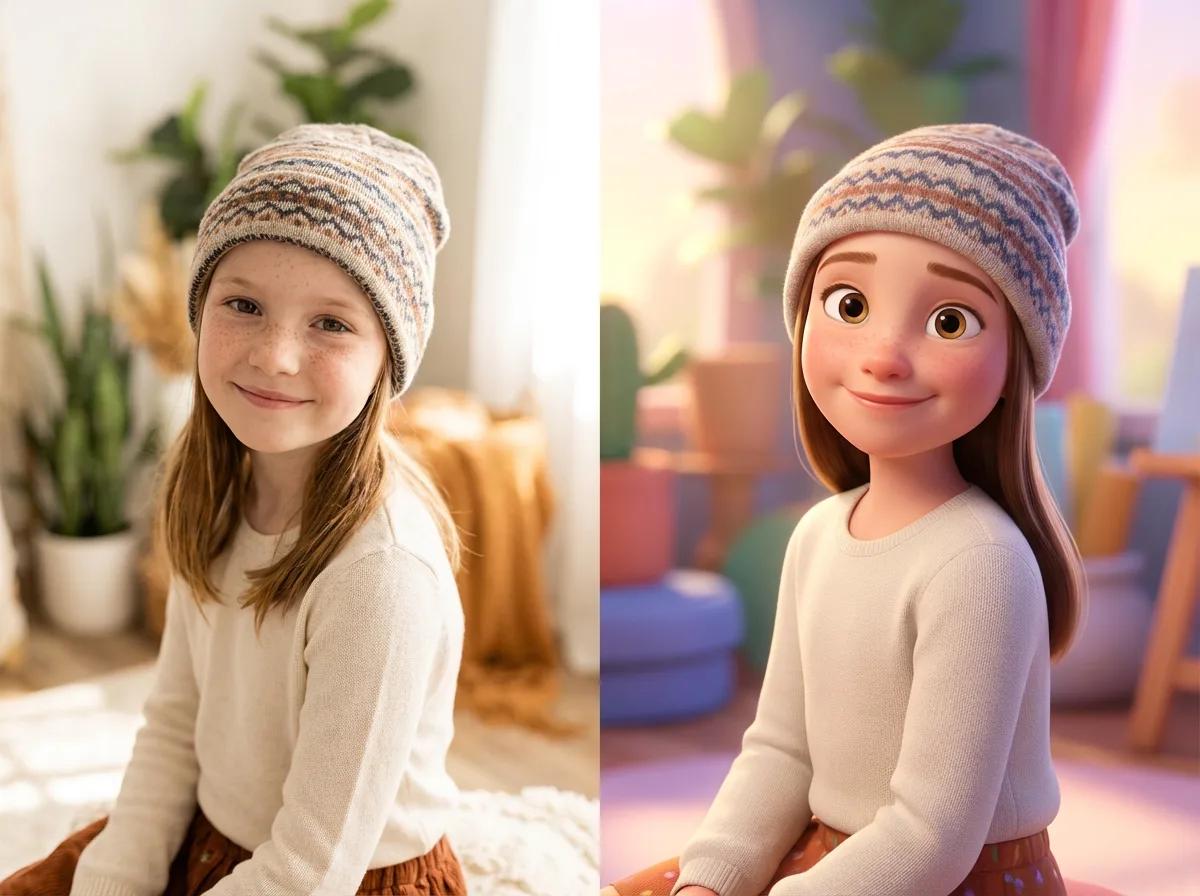
Photo to Pixar style conversion — before and after Pixar 3D cartoon transformation

Support: JPG, JPEG, PNG | Max file size: 10 MB

OR

✨ Free to try • No signup required • Instant results

4.9 / 5.0

User Rating

1,000+

Reviews

23,000+

Happy Creators

Enjoyed this? You will love our AI Cartoon Storytelling tool

Turn your cartoon into a character you can use across multiple scenes, poses, and stories. Join thousands of creators bringing their cartoon stories to life with Neolemon.

How to Write AI Cartoon Prompts

Master this simple character description formula to generate consistent, professional-quality cartoon illustrations from text every time.

The Character Formula

[Who they are]+[Key details]+[What they wear]

Character formula example showing a young girl with labels: Who they are (young girl, child, toddler), Key details (orange wavy hair, big brown eyes, rosy cheeks), What they wear (pink beanie, navy coat, red sneakers)

Example Cartoon Prompts

"A young boy, curly brown hair and green eyes, wearing a red hoodie and blue jeans"

3D cartoon boy with curly brown hair and green eyes wearing a red hoodie

"A teenage girl, long black braids and warm brown skin, wearing a yellow sundress"

3D cartoon girl with long black braids wearing a yellow sundress

"A friendly old wizard, long white beard and kind eyes, wearing purple robes and a pointed hat"

3D cartoon wizard with white beard wearing purple robes and pointed hat

Pixar-Style Cartoon Examples

See how Neolemon transforms ordinary photos into Pixar-inspired 3D cartoon characters with vibrant colors and expressive features.

Blue and gold macaw before and after AI cartoon portrait transformation
Woman with curly hair before and after AI cartoon portrait
Man in gray sweater before and after Pixar-style cartoon
Elderly man with beard before and after AI cartoon transformation
Elderly woman with scarf before and after AI cartoon portrait
Woman in black sweater before and after cartoon transformation
Girl with beanie before and after AI cartoon portrait
Boy with red hair before and after Pixar-style cartoon

How to Convert Photos to Pixar Style

Three simple steps to get your Pixar-style cartoon.

1

Upload or Describe

Drop in a photo to cartoonify, or describe your character in plain text. Works with selfies, portraits, pets, or pure imagination.

2

Pick Your Art Style

Select from 12 illustration styles including Pixar-inspired 3D, anime, watercolor, and more.

3

Download Your Cartoon

Your AI-generated cartoon is ready in under 30 seconds. Download in high resolution for print or digital use.

11 Illustration Styles

From Pixar-style 3D to hand-drawn watercolors, find your perfect look

Pixar Inspired

Pixar Inspired

3D animated movie style

Coloring Book

Coloring Book

Black & white line art

Anime

Anime

Japanese animation style

Modern Western Cartoon

Modern Western Cartoon

Clean lines, flat colors

Chibi

Chibi

Cute, big head style

Action Comic

Action Comic

Dynamic comic book style

Minimalist Vector

Minimalist Vector

Simple geometric shapes

Watercolor Illustration

Watercolor Illustration

Soft, painterly effect

2D Flat Illustration

2D Flat Illustration

Modern flat design

3D Cartoon

3D Cartoon

Rendered 3D characters

Claymation 3D

Claymation 3D

Stop-motion clay style

Perfect For

📚Children's Book Illustration
📱YouTube & Social Content
🎓Educational Materials
👤Profile Avatars
📖Amazon KDP Publishing
🎨Cartoon Stories & Comics

Why Choose Neolemon for Pixar-Style Cartoons?

The fastest way to turn any photo into a Pixar-inspired 3D character

Photo to Cartoon Character

Upload one photo. Get a cartoon character you can use across multiple images, scenes, and stories.

Consistent Characters

Generate 10, 20, or 50 images and your character looks identical in all of them. Other AI tools can't do this.

Create Cartoon Storybooks

Your cartoon character in different poses, expressions, and backgrounds. Perfect for children's books and visual stories.

12 Illustration Styles

Pixar-style, watercolor, anime, storybook, and more. All print-ready quality.

How to Take the Perfect Photo for Cartoon Conversion

Get better results in seconds. Here's what makes a great source photo.

Good Photos

Clear well-lit photo suitable for AI cartoon generation
Clear & Well-Lit

Natural daylight, face fully visible

Close-up portrait photo ideal for AI cartoon transformation
Close-Up Shot

Head and shoulders fill most of the frame

Photo with visible eyes looking at camera for AI cartoon
Eyes Visible

Subject looking toward camera, eyes in focus

Photo with clean simple background perfect for AI cartoon
Simple Background

Less clutter = better AI recognition

What to Avoid

Blurry motion photo example showing what to avoid for cartoons
Motion Blur

Moving subjects create fuzzy, unusable images

Dark underexposed photo example to avoid for AI cartoons
Too Dark

AI struggles to detect features in low light

Distant photo showing what to avoid for AI cartoons
Too Far Away

Subject should be the main focus, not the scenery

Multiple subjects photo showing why to focus on one at a time
Too Many Subjects

Upload one main subject per photo for best results

💡Pro Tips for the Best Cartoon Results

  • 1Use your phone's portrait mode for automatic background blur
  • 2Photograph at eye level for a more engaging result
  • 3Good lighting helps! Natural daylight works best
  • 4Already have a great photo? Even older pictures work perfectly

One Character. Unlimited Scenes.

See how Neolemon keeps your cartoon characters consistent across every image — the same technology powering your pet portraits.

Create characters that stay identical across 20, 50, or 100+ images. Perfect for children's books, social content, and animated stories.

Why Neolemon for Photo to Cartoon?

Not all AI cartoon generators are created equal.

Character Consistency

Neolemon
Same character across 50+ images
Generic AI
Different every time
Filters
No character memory

Illustration Styles

Neolemon
12 curated styles
Generic AI
3-5 basic options
Filters
Preset filters only

Create Cartoon Storybooks

Neolemon
Multiple scenes & poses
Generic AI
Single images only
Filters
Not possible

Generation Speed

Neolemon
~15 seconds
Generic AI
1-3 minutes
Filters
Instant

Print Resolution

Neolemon
300 DPI ready
Generic AI
Varies
Filters
Often 72 DPI

Background Removal

Neolemon
Included free
Generic AI
Often paid add-on
Filters
Not available

Free Trial

Neolemon
No signup required
Generic AI
Usually requires account
Filters
Free with ads

What makes Neolemon different?

Other tools create one-off images. Neolemon creates a cartoon character from your photo that stays consistent across every image.

📚 Children's Books📱 Social Content🛍️ Merchandise

No credit card required — Create your first cartoon character in under 30 seconds.

Photo to Pixar FAQ

Common questions about converting photos to Pixar-style cartoons

Our Pixar-Inspired style replicates the warm lighting, soft skin textures, and expressive eyes seen in Pixar films like Coco, Up, and Inside Out. The 3D Cartoon style is a more generic rendered look without the signature Pixar aesthetic.
Absolutely. Upload a clear photo of your pet and select the Pixar Inspired style. The AI will transform your pet into a Pixar-like 3D character, complete with expressive eyes and smooth rendering.
The AI captures the subject's key features — face shape, hair, clothing — and renders them in the distinctive Pixar 3D style. Results are best with clear, well-lit photos where the face is visible.
Yes. You get 20 free credits when you sign up (no credit card required). Each Pixar generation costs 4 credits, so you can create 5 free Pixar-style images to try out.
Yes. All Pixar-style images you generate are yours to use for any commercial purpose, including Amazon KDP children's books, merchandise, marketing materials, YouTube thumbnails, and print-on-demand products.
Absolutely. The Pixar style is one of the most popular choices for children's books. You can maintain character consistency across every page, and all images export in print-ready resolution that meets Amazon KDP's 300 DPI requirements.
Create your base Pixar character first, then use our Action Editor, Expression Editor, and Background Editor to generate variations. The system automatically maintains your character's Pixar-style appearance while changing their pose, emotion, or setting.
No design skills required. Upload a photo and select the Pixar Inspired style, or describe your character in plain English. Our AI handles all the artistic rendering. We also include an "AI Improve" button that enhances basic descriptions into detailed prompts.

Ready to Bring Your Cartoon Stories to Life?

Join 23,000+ writers, educators and creators who are creating awesome cartoons for children's stories with Neolemon App.

Free to start • $29/month for basic plan with commercial use.